

FAQ
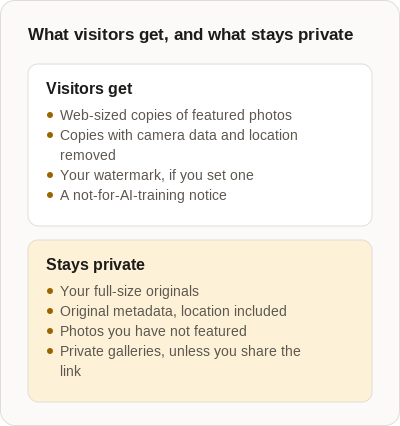
FrameRoost is a portfolio site for nature, wildlife and travel photographers, free on any plan during the beta, until at least February 28, 2027. Your photos stay yours, nothing is public until you feature it, camera location data is removed from every copy visitors see, and every site is marked not for AI training.
What is FrameRoost?
Section titled “What is FrameRoost?”A place to put your photography online: a portfolio site with a public gallery for your best work, a video page, private galleries you share by link, and your own domain if you want one. It’s built for photographers who’d rather be out shooting than maintaining a website.
Who is it for?
Section titled “Who is it for?”Serious hobbyists — especially nature, wildlife and travel photographers — and camera clubs. It works just as well for anyone who wants a clean, simple home for their photos and video.
How much does it cost?
Section titled “How much does it cost?”Nothing during the beta, which runs until at least February 28, 2027: beta testers can pick any plan on their site’s Billing page, free and with no card. After launch there’s a free plan and paid plans from $5 a month, priced by storage. See Pricing.
What happens when the beta ends?
Section titled “What happens when the beta ends?”The beta runs until at least February 28, 2027, and we’ll email you at least 30 days before it ends. Then it’s your choice:
- Choose a paid plan. As a thank-you, beta testers get 25% off their first year.
- Keep your site on Free. Nothing is deleted: your photos and videos stay on your site, and existing videos keep
playing. If you’re storing more than Free’s 2 GB, new uploads pause until you’re back under it or choose a plan,
and a custom domain needs a paid plan (visitors are sent to your
frameroost.photosaddress instead).
Nothing is ever charged unless you choose a paid plan and enter a card yourself.
How do I join?
Section titled “How do I join?”Ask to join the beta. You’ll receive an email when the beta begins, with an invite to sign up.
Are my photos public as soon as I upload them?
Section titled “Are my photos public as soon as I upload them?”No. Only photos you feature appear in your public gallery. Everything else stays in your library until you choose it, or you share it in a private gallery.
Do I keep the rights to my photos?
Section titled “Do I keep the rights to my photos?”Yes. Your photos and videos are yours. We only store and show them to run your site.
Can people download my photos?
Section titled “Can people download my photos?”Anyone can save what their browser shows them — that’s true of every website. What they get is the web-sized copy, never your full-size original, which is stored privately and can’t be viewed or downloaded from your site. You can add a watermark that’s built into the web-sized copy of every photo your visitors see — except where you choose to leave it off: your homepage’s hero image, or a private gallery.
Does my camera’s location data show up?
Section titled “Does my camera’s location data show up?”No. The copies visitors see have all camera metadata removed, including where the photo was taken, so sensitive locations (a nesting site, say) stay private. Your original keeps its metadata exactly as uploaded, but it’s stored privately and never shown or downloadable. FrameRoost reads only the date taken from it, to sort your photos. The only thing written into the copies is a copyright notice in your site’s name and a “not for AI training” tag (see the next question).
Can AI companies train on my photos?
Section titled “Can AI companies train on my photos?”Not with your permission. Every FrameRoost site tells AI crawlers, in all the standard ways, that its photos and videos aren’t available for AI or machine-learning training:
- a
robots.txtthat blocks the crawlers AI companies use to collect training data (GPTBot, ClaudeBot, Google-Extended, CCBot and others), on your site and on the server your image files come from - a reservation of text and data mining rights under the W3C TDM Reservation Protocol, which is how EU copyright law expects rights holders to opt out
- a
noai, noimageaitag on every page and image - a “data mining prohibited” field and copyright notice inside every photo copy, which stay with the file if someone downloads it
Search engines and link previews aren’t affected, so your site can still be found and shared. No website can physically stop a scraper that ignores these signals, but they make your wishes clear and machine-readable, and the major AI companies say they honor them. You don’t need to turn anything on.
What file types can I upload?
Section titled “What file types can I upload?”Photos: JPEG, PNG or WebP, up to 100 MB each. Video (paid plans): MP4, MOV, WEBM or M4V, up to 4 GB each.
Can I use my own domain?
Section titled “Can I use my own domain?”Yes, on any paid plan. You add one DNS record and FrameRoost handles the secure certificate. See Custom domains.
Will search engines find my site?
Section titled “Will search engines find my site?”Yes, your public pages can be found by search engines, the same as any website.
I have a big library on another site. Can I move it?
Section titled “I have a big library on another site. Can I move it?”Upload as many photos at once as you like from the Photos page. Moving something really large? Email [email protected] and we’ll help.
Can I share my photos on social media from FrameRoost?
Section titled “Can I share my photos on social media from FrameRoost?”Yes. Connect Bluesky, Instagram and your Facebook Page under Settings > Social accounts, then post your photos to all of them at once from Social posts in your admin. Photos go out as your watermarked web-sized copies, never your originals. See Social posts.
Can I show my photos on my TV?
Section titled “Can I show my photos on my TV?”Soon. The FrameRoost app for Samsung TVs is coming soon to the Samsung TV app store. Connect a TV to your site with a code and it shows your galleries, photo by photo or as a slideshow. See FrameRoost on TV.
Can more than one person run a site?
Section titled “Can more than one person run a site?”Yes. Invite people from Settings → Team as admins or owners.
How do I delete my site?
Section titled “How do I delete my site?”Email [email protected] from your account’s address and we’ll delete your site, its photos and videos, and your account.
How do I get help or send feedback?
Section titled “How do I get help or send feedback?”Use Send feedback in your site’s admin, or email [email protected].