

Welcome
FrameRoost gives you a portfolio site for your photos and video: a public gallery for your best work, private galleries you share by link, posts to Bluesky, Instagram and your Facebook Page, slideshows on your TV (coming soon to Samsung), and your own domain if you want one. These pages walk through everything you can do.
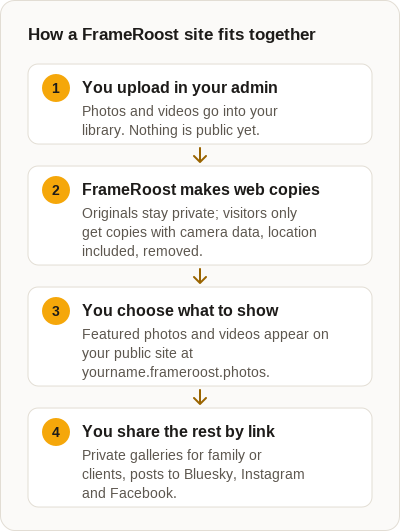
How does a FrameRoost site work?
Section titled “How does a FrameRoost site work?”A FrameRoost site has two sides: the public site your visitors see, and the admin where you run it.
Your public site lives at yourname.frameroost.photos, or on your own domain on a paid
plan. It has a Home page that opens on one of your hero images, a Gallery of your featured photos (with your public galleries in a dropdown under it), a
Videos page, an About page once you’ve written one, and a Contact page with a form that emails you.
Your admin is at yourname.frameroost.photos/admin; you sign in at /login on the same address, even after you
connect your own domain. Its sidebar has Photos, Videos, Galleries, Social posts, TVs and
Settings. Site owners also see Domain and Billing. The storage meter in the sidebar shows
your plan and how much of it you’ve used.
What can visitors see, and what stays private?
Section titled “What can visitors see, and what stays private?”Nothing is public until you choose it. Uploads go into your library. Only photos you feature appear in your public gallery. See Are new photos public?.
Private galleries are seen only by people with their link. Private galleries aren’t listed anywhere on your site, and visitors don’t need to sign in. Putting a photo in a private gallery doesn’t make it public; only featuring it does. Public galleries are listed under Gallery in your menu for everyone. See Galleries.
Originals stay private. For every photo, FrameRoost keeps your original file and makes a web-sized display copy and a thumbnail. Visitors only ever get the copies; the original can’t be viewed or downloaded from your site.
The copies are cleaned and marked. Camera metadata, including location, is removed from them, and your watermark is built into them if you set one up. Your original keeps its metadata exactly as uploaded.
Videos get a web-friendly version for smooth playback; your original is kept untouched. See Videos.
Plans in brief
Section titled “Plans in brief”Plans are priced by storage, and every paid plan includes every feature. Free gives you 2 GB, with no video, no custom domain and a small “Powered by FrameRoost” badge. The paid plans are Starter (50 GB, $5 a month), Enthusiast (100 GB, $9), Pro (500 GB, $19) and Studio (2,000 GB, $39); paying yearly saves about 15%. Your originals and their copies all count toward storage.
During the beta, every plan is free for beta testers until at least February 28, 2027, with no card needed. We’ll email you at least 30 days before the beta ends; then you can choose a paid plan with 25% off your first year, or keep your site on Free. Nothing is deleted either way. See Plans & billing.
Who can help run my site?
Section titled “Who can help run my site?”Anyone you invite to your site’s team. Admins manage photos, videos, private galleries and settings. Owners can do all of that, and also invite and remove people and look after the domain and billing. Every site keeps at least one owner, and everyone signs in with their own email and password. See Team.
Limits at a glance
Section titled “Limits at a glance”The largest files you can upload, and how many domains a site and photos a post can have:
| What | Limit |
|---|---|
| Photos | JPEG, PNG or WebP, up to 100 MB each |
| Videos (paid plans) | MP4, MOV, WEBM or M4V, up to 4 GB each |
| Logo | PNG, JPEG or WebP, up to 5 MB |
| Custom domains | Up to 3 per site, paid plans only |
| Photos per social post | Bluesky 4, Instagram 10, Facebook 10 |
Common tasks
Section titled “Common tasks”Each task links to the page, or the part of it, with the steps:
| Task | How |
|---|---|
| Put your first photos online | Upload, then feature your keepers and pick hero images. |
| Add a watermark, or change it | Settings > Watermark. Photos you’ve already uploaded update on their own. |
| Send a client or family their photos | Create a private gallery and share its link, with or without your watermark. |
| Change your site name, logo or colors | Settings. |
| Let someone else help run the site | Invite them to your team. |
| Post to social media | Connect your accounts, then write a post. |
| Use your own domain | Connect www.yourname.com. |
| Get more storage or video | Choose or change a plan. |
| Out of space | See Over your storage limit. |
| Forgot your password | Use Forgot password? on your site’s sign-in page. See Getting started. |
Where can I get help?
Section titled “Where can I get help?”Use Send feedback in your site’s admin, or email [email protected], when these pages don’t cover something. Feedback comes straight to us, and during the beta it shapes what gets built next. If you’re moving a really large library from another site, email us and we’ll help.